This is an old revision of the document!
ZeroTier Support in APdesk and MESHdesk
ZeroTier Introduction
- ZeroTier support in APdesk and MESHdesk is different when compared to Wireguard, IKEv2+IPsec or OpenVPN.
- With ZeroTier you do not have to worry about the server side since it is hosted by ZeroTier.
- Another important point about the ZeroTier VPN connection is that you can not use it to access the Internet.
- ZeroTier is typically used to to create a private network where you can access devices on that network.
ZeroTier Central
- To manage ZeroTier networks, you have to register at ZeroTier (https://www.zerotier.com/).
- There are free plans available which has certain restrictions in terms of the amount of devices that are allowed on the network.
- There are also two versions of the dashboard, the original one is called Legacy Central and the new one is called New Central.
- It seems the one you should use depends on when you registered with them.
- I tried New Central and could not get to devices listed on Legacy Central.
- The screenshots here are from Legacy Central.
ZeroTier Networks
- Each network in Zerotier will have a unique Network ID which will be used by the client to join the network.
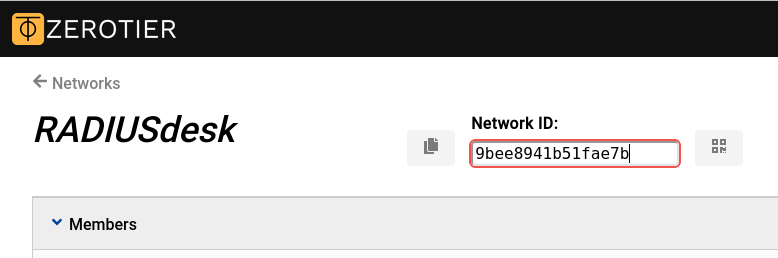
- After a client joined the network it will appear in the list of devices as an Unauthorized device.
- You can then change its status to Authorized to allow it full access to the ZeroTier network
MESHdesk Firmware
- The MESHdesk firmware includes support for ZeroTier since Jan 2026.
- When you build the firmware make sure you include:
- Network → VPN → zerotier
- After selecting it also select the following Configuration options:
- Build in debug mode
- Build a self test program
- To make the ZeroTier package appear in the available list of packages, you need to install it into the SDK
./scripts/feeds install zerotier
- Note that ZeroTier might not fit on devices with limited flash.
- Fortunately OpenWrt can also be running as a VM.
- In our setup we created a virtual setup in VirtualBox and ran an OpenWrt instance which are then configured using APdesk
Join a ZeroTier Network
- Joining a ZeroTier Network is very easy in APdesk and MESHdesk.
- Make sure the MESHdesk firmware is recent and the ZeroTier package is included in the firmware built.
- Edit the VPN connections of the device which you want to use to join the ZeroTier network.
- Specify the ZeroTier Network ID.
- The interface name will be automatically populated when you save the entry.
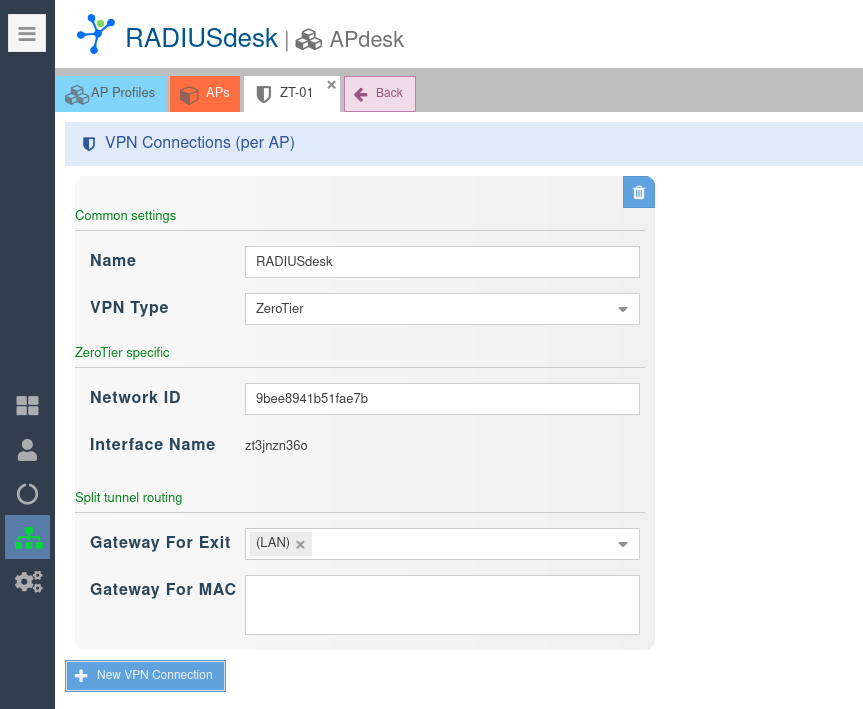
Split tunnel routing
- As stated earlier, you can not use a ZeroTier network to break out into the Internet.
- This makes split tunnel routing optional since any device connected to the AP would be able to access the ZeroTier network (without having to specify anything under the Split tunnel routing section.
- If however you want a certain network or MAC Address to ONLY have access to the ZeroTier and no Internet access, you will be using the Split tunnel routing section.
Onboarding
- After you added the ZeroTier VPN entry, reboot the device in order for it to fetch its latest settings.
- You should see it appear in ZoreTier Central as an Unauthorized device

- Authorize it

- Reboot the device and confirm that it got an IP now

- You should now be able to reach any of the other devices on that ZeroTier network through the AP.
Confrim on OpenWrt
- You can log into the AP to confirm everything works as intended by issuing the following commands.