This is an old revision of the document!
Table of Contents
RADIUSdesk API Permanent Users
Introduction
- A Permanent User in RADIUSdesk has the following reference ids to other entities.
- user_id This is the id of the owner (Access Provider) to which the Permanent User belong.
- realm_id Each Permanent User has to belong to a Realm. A Realm is like a group but used by RADIUS.
- profile_id Each Permanent User have to a Profile. A Profile can be used by RADIUS to dictate the service (bandwidth, amount of data available etc) a Permanent User will get when connecting to the Internet.
- So to recap. A Permanent User has to have:
- An Owner
- A Realm
- A Profile
- This will be important when we want to use the API to create a Permanent User which is why we cover it first.
Adding A New Permanent User
API URL
- We assume the FQDN of the RADIUSdesk server is hotspot.radiusdesk.com. Please adapt accordingly.
Items included in the POST
- The following is the minimum items than needs to be included in the POST request.
{
    "user_id":0,
    "username":"demo2",
    "password":"demopassword",
    "realm_id":1,
    "profile_id":1,
    "token":"b4c6ac81-8c7c-4802-b50a-0a6380555b50"
}
- Lets discuss these items listed.
| Item | Typical Value | Comment |
|---|---|---|
| user_id | 0 | The special value of 0 (Zero) will make the owner of the token the owner of the Permanent User. |
| username | demo2 | Unique username. Can even be an email address. See discussion about the suffix later in this document. |
| password | demopassword | Password for user. No restrictions is placed on the length. |
| realm_id | 1 | The ID of the Realm the user should belong to. |
| profile_id | 1 | The ID of the Profile the user should belong to. |
| token | b4c6ac81-8c7c-4802-b50a-0a6380555b50 | The API token of the user who initiate the API call |
Finding the detail of the items
API Key
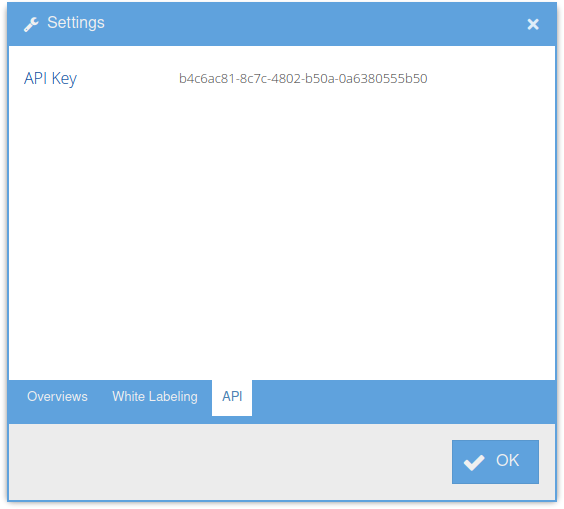
- Each Access Provider (including the root user) in RADIUSdesk has a unique security token associated with them referred to as the API Key. This token changes each time the Access Provider password is changed.
- An Access Provider can see their own API Key.
- Log into RADIUSdesk
- At the top right, click the menu button and select Settings.
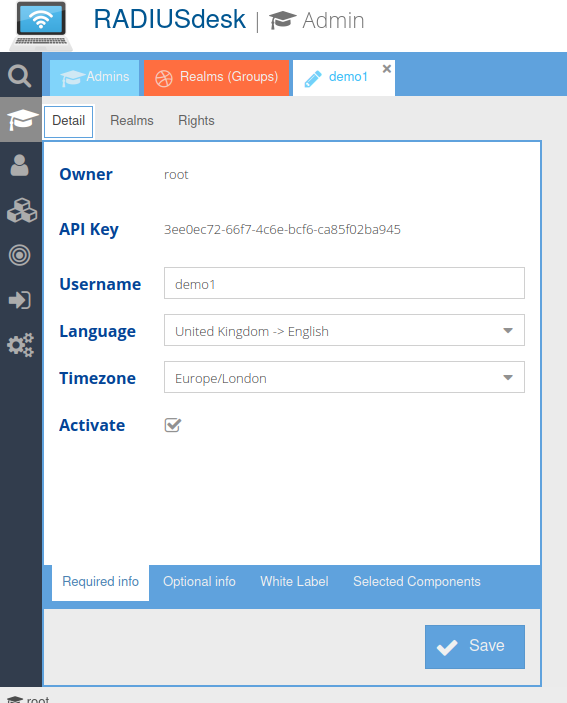
- An Access Provider can see any of the Access Providers under it by going to the Access Providers applet and edit a selected Access Provider. There will be a read-only field with the API Key for the selected Access Provider.
Realm
- The list of Realms are shown by calling this URL
Profile
- The list of Profiles are shown by calling this URL